SharePoint 2010 Service Application Development 101 - Getting Started
In this series, we will explore what it takes to build and manage a custom service application in SharePoint 2010. The most attractive reason to me for building a service application is to logically b
In this series, we will explore what it takes to build and manage a custom service application in SharePoint 2010. The most attractive reason to me for building a service application is to logically bundle a set of services and/or capabilities provided by in-house and 3rd party applications and systems within the SharePoint infrastructure. Assuming SharePoint is being used heavily within an organization, these services and/or capabilities are easily distributed to users, and centrally managed by IT. This is part 1 of a short series on developing service applications in SharePoint 2010:
- Part 1 (This Post): Getting Started with SAF + Starter Solution (with Logging / Configuration / Service Locator)
- Part 2: Custom Service Application - Logical Components
- Part 3: Custom Service Application - Base Solution
- Part 4: Custom Service Application - Full Infrastructure (with Admin UI and PowerShell)
- Part 5 (Final): Custom Service Application – Integrating features and capabilities into your service application (sample MailChimp integration)
I’ve built a couple service applications over the last 3 years or so, and I thought it might be fun to write a couple blog posts on the subject, especially given that SharePoint 2013 is just around the corner, and that the Service Application Framework (SAF) will continue to be a big part of SharePoint going forward. My perspective on service applications is that companies (especially large companies that have invested in SharePoint) can really take advantage of this framework to expose functionality throughout their SharePoint farm(s) in a way that allows them to centrally manage what and how things are deployed and distributed across SharePoint sites, departments, and the user-base.
Why develop a custom service application?
In this MSDN article, Microsoft points out that service applications offer 6 major things: application pool provisioning, database provisioning, claims-based security support, backup/restore/upgrade support, out-of-the-box load balancing, and custom permission rights. These are all really great things that companies I think can get excited about. The article then describes the types of business requirements that lend to investing in the development of a custom service application. I think this is where the article falls short. These business requirements don’t really sell SAF adequately, in fact they don’t really “jive” with the real-world type of requirements that I see companies having. Because these business requirements don’t share commonalities with what business and program managers actually face, these managers may not think of SharePoint SAF as a worthwhile investment, and in my mind are missing out on some real potential benefits in fully utilizing their SharePoint investment. To me, the most attractive reason for building a service application is to logically bundle a set of services and/or capabilities provided by in-house applications and systems, as well as 3rd party (i.e.: NOT SharePoint) systems and expose those within the SharePoint infrastructure. Assuming SharePoint is being used heavily within an organization, these services and/or capabilities are easily distributed to users, and centrally managed by IT. Here are some examples of services and/or capabilities that I’ve worked with that could be made available to SharePoint users in a centrally managed way:
- Exposing Bills of Materials (EBOMs or MBOMs) from an ERP system like SAP to SharePoint sites, and linking BOM parts and manufacturing routings to any significant project documentation, etc.
- Making customer information available from a CRM system like SalesForce.com available within a SharePoint portal
- Exposing engineering information from a PLM system like Enovia, or Windchill within SharePoint, and perhaps allowing users to visualize engineering processes and approve tasks managed within those PLM systems directly from within SharePoint.
- Accessing documents from any number of other internal CMS and collaboration systems in the enterprise, like eRoom, or FileNet.
- Accessing reports from enterprise reporting systems like Cognos, or SAS.
- … building integrations that merge SharePoint usefulness with any number of 3rd party systems used within an organization
Not only are service applications useful for integrating and extending the surface area of the tools and capabilities already in use within an organization, service applications are also useful for enabling new capabilities, for example:
- Creating a payment gateway integration application or set of services to easily process credit cards and track orders in a secure fashion (easily consumed by 3rd party applications, SharePoint web parts, SharePoint 2013 apps)
- Creating an email newsletter engine infrastructure that allows site/web/app owners to create and customize the look & feel of emails and notifications using templates
- And most generally, providing a singular infrastructure within an application to add capabilities to the SharePoint investment and manage new code in a central way by exposing new functionality using web services and custom UIs all-the-while storing data in a repository of choice that is managed apart of, or within the SharePoint database infrastructure (i.e.: data is NOT stored necessarily in SharePoint lists).
Some background on SAF development
When I built my first service application in 2009, there was very little information available and I had to use .NET Reflector to analyze the existing SharePoint service application code to figure out how SAF actually worked. I ended up discovering a maze of classes and methods, some real head-scratching as I recall. If you were to google “sharepoint 2010 service application framework” now, you would find lots of information on the subject (much of it dated back to 2010 and 2011), including a training video by Andrew Connell (Creating Custom Service Applications), an overview slide-deck by Andy Nogueira (Service Applications in SharePoint 2010) and also some useful samples to examine, such as: autocompletedemo, Wingtip Calculator, SridharServiceApplication, CSSharePointCallClaimsAwareWCF, SuperCoolServiceApplication. If you’re interested in SAF, there’s some interesting stuff out there. Some have highlighted the complexity of building a service application:
- From Andrew Connell’s video talk: this is “not for the faint of heart”
- From Sridhar’s blog: “This was not an easy joke at all and is pretty involved process.”
- From Todd Bleeker: “However, with over a dozen moving parts, Service Applications can be quite overwhelming to create.”
I think it’s well worth taking note of these warnings; however, the good news is that there is LOTS of information out there to help you build a custom service application infrastructure within your organization, and the task should not be as daunting now as it was at first.
Getting Started
In these few blog posts, I’ll layout a typical Visual Studio solution format I’ve used in the past for building and deploying a service application, something that’s generic enough to support most requirements an organization may have. I’ll use a fictitious organization called “MyCorp” as an alias for a real corporation/organization. In this first post, I’ll do the following:
- Create the visual studio solution
- Create the base infrastructure needed to support typical SharePoint development within an organization, including:
- Setting up the service locator infrastructure
- Setting up the logging infrastructure
- Layout the Visual Studio projects to adequately decouple responsibility areas
> NOTE: While this is just my way of laying out a solution, it is in NO WAY the definitive way. Your organization’s SharePoint Architect or Lead Developer should be able to do this using his/her own favorite strategy.
The Visual Studio Solution
The solution (which can be downloaded at the bottom of this post) looks as follows:
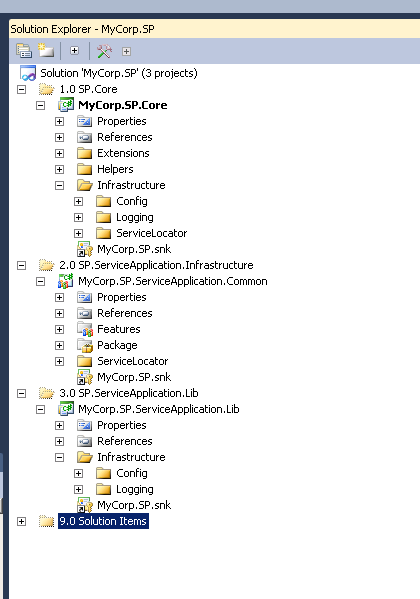 Couple comments on the above:
- MyCorp.SP.Core is a class library project that contains generic core code used across ALL SharePoint projects within an organization. It is meant to provide a single place for general stuff like custom extension methods, utility and helper classes, and core interfaces and means of accessing shared infrastructure by way of the service locator (more later on this …)
- MyCorp.SP.ServiceApplication.Common is a SharePoint project that we’ll use to deploy common SharePoint infrastructure artifacts (my preference is to minimize the amount of C# code in SharePoint projects unless the code is specifically related to feature installation/activation/deactivation, or tied to SharePoint modules, web parts, layout pages, etc…). As a general best practice, it’s my preference to keep business logic, service code in separate class library projects.
- MyCorp.SP.ServiceApplication.Lib is a class library project which will contain implementations of service interfaces as well as the ServiceApplication classes (which I’ll build in the next blog post).
Service Locator Implementation
To use the service locator, I create a generic static Locator class I can easily reference across my SharePoint projects.
using System;
using System.Collections.Generic;
using System.Diagnostics;
using Microsoft.Practices.SharePoint.Common.ServiceLocation;
using Microsoft.SharePoint;
using MyCorp.SP.Infrastructure.ServiceLocator;

namespace MyCorp.SP
{
    public static class Locator
    {
        [DebuggerStepThrough]
        public static object Resolve(Type type)
        {
            ArgumentValidator.IsNotNull(type, "type");

            return ServiceLocatorWrapper.GetInstance(type);
        }

        [DebuggerStepThrough]
        public static object Resolve(SPSite site, Type type)
        {
            ArgumentValidator.IsNotNull(type, "type");

            return ServiceLocatorWrapper.GetInstance(site, type);
        }

        [DebuggerStepThrough]
        public static object Resolve(Type type, string name)
        {
            ArgumentValidator.IsNotNull(type, "type");
            ArgumentValidator.IsNotEmpty(name, "name");

            return ServiceLocatorWrapper.GetInstance(type, name);
        }

        [DebuggerStepThrough]
        public static object Resolve(SPSite site, Type type, string name)
        {
            ArgumentValidator.IsNotNull(type, "type");
            ArgumentValidator.IsNotEmpty(name, "name");

            return ServiceLocatorWrapper.GetInstance(site, type, name);
        }

        [DebuggerStepThrough]
        public static T Resolve<T>()
        {
            return Resolve<T>(null, null);
        }

        [DebuggerStepThrough]
        public static T Resolve<T>(SPSite site)
        {
            return Resolve<T>(site, null);
        }

        [DebuggerStepThrough]
        public static T Resolve<T>(string name)
        {
            return Resolve<T>(null, name);
        }

        [DebuggerStepThrough]
        public static T Resolve<T>(SPSite site, string name)
        {
            if (name.IsNullOrEmpty())
                return ServiceLocatorWrapper.GetInstance<T>(site);
            else
                return ServiceLocatorWrapper.GetInstance<T>(site, name);
        }

        [DebuggerStepThrough]
        public static IEnumerable<T> ResolveAll<T>()
        {
            return ServiceLocatorWrapper.GetAllInstances<T>();
        }

        [DebuggerStepThrough]
        public static IEnumerable<T> ResolveAll<T>(SPSite site)
        {
            return ServiceLocatorWrapper.GetAllInstances<T>(site);
        }

        [DebuggerStepThrough]
        public static IEnumerable<object> ResolveAll(Type type)
        {
            return ServiceLocatorWrapper.GetAllInstances(type);
        }

        [DebuggerStepThrough]
        public static IEnumerable<object> ResolveAll(SPSite site, Type type)
        {
            return ServiceLocatorWrapper.GetAllInstances(site, type);
        }

        [DebuggerStepThrough]
        public static void Reset()
        {
            SharePointServiceLocator.Reset();
        }
    }
}
The ServiceLocatorWrapper class is a wrapper around the SharePoint Service Locator available on codeplex. I also created a LocatorRegistrar class that allows SharePoint projects to easily register interface implementations as well. The register/unregister methods look like the following.
[DebuggerStepThrough]
public static void Register<TInterface, TService>(SPSite site, string name) where TService : TInterface, new()
{
    var typeMappings = ServiceLocatorWrapper.GetInstance<IServiceLocatorConfig>(site);

    if (name.IsNullOrEmpty())
        typeMappings.RegisterTypeMapping<TInterface, TService>();
    else
        typeMappings.RegisterTypeMapping<TInterface, TService>(name);
}

[DebuggerStepThrough]
public static void RegisterSingleton<TInterface, TService>(SPSite site, string name)
    where TService : TInterface, new()
{
    var typeMappings = ServiceLocatorWrapper.GetInstance<IServiceLocatorConfig>(site);

    var singletonTypeMapper = typeMappings as ServiceLocatorConfig;
    if (singletonTypeMapper == null)
        return;

    if (name.IsNullOrEmpty())
        singletonTypeMapper.RegisterTypeMapping<TInterface, TService>(null, InstantiationType.AsSingleton);
    else
        singletonTypeMapper.RegisterTypeMapping<TInterface, TService>(name, InstantiationType.AsSingleton);
}

[DebuggerStepThrough]
public static void Unregister<TInterface>(SPSite site, string name)
{
    var typeMappings = ServiceLocatorWrapper.GetInstance<IServiceLocatorConfig>(site);

    if (name.IsNullOrEmpty())
        typeMappings.RemoveTypeMapping<TInterface>(null);
    else
        typeMappings.RemoveTypeMapping<TInterface>(name);
}

[DebuggerStepThrough]
public static void UnregisterSingleton<TInterface>(SPSite site, string name)
{
    var typeMappings = ServiceLocatorWrapper.GetInstance<IServiceLocatorConfig>(site);
    var singletonTypeMapper = typeMappings as ServiceLocatorConfig;

    if (singletonTypeMapper == null)
        return;

    if (name.IsNullOrEmpty())
        singletonTypeMapper.RemoveTypeMapping<TInterface>(null);
    else
        singletonTypeMapper.RemoveTypeMapping<TInterface>(name);
}
Finally, I use the FeatureInstalled and FeatureUninstalling methods of the Service Application Infrastructure feature receiver to install and uninstall the service locator mappings. Within these methods, I call a ServiceLocatorInstaller class which does a couple things, registers diagnostic areas (see Logging section below) for logging in ULS, and registers service mappings using a ServiceLocatorRegistrar class.
using Microsoft.Practices.SharePoint.Common.ServiceLocation;
using Microsoft.SharePoint;

namespace MyCorp.SP.ServiceApplication.Common.ServiceLocator
{
    internal static class ServiceLocatorInstaller
    {
        internal static void Install(SPFeatureReceiverProperties properties)
        {
            DiagnosticsAreaRegistrar.RegisterDiagnosticAreas();

            var serviceLocator = SharePointServiceLocator.GetCurrent();
            var typeMappings = serviceLocator.GetInstance();

            var typeMapper = typeMappings as ServiceLocatorConfig;
            if (typeMapper == null)
                return;

            ServiceLocatorRegistrar.RegisterMappings(typeMapper);

            SharePointServiceLocator.Reset();
        }

        internal static void Uninstall(SPFeatureReceiverProperties properties)
        {
            var serviceLocator = SharePointServiceLocator.GetCurrent();
            var typeMappings = serviceLocator.GetInstance();

            var typeMapper = typeMappings as ServiceLocatorConfig;
            if (typeMapper == null)
                return;

            ServiceLocatorRegistrar.RemoveMappings(typeMapper);

            SharePointServiceLocator.Reset();

            DiagnosticsAreaRegistrar.UnregisterDiagnosticAreas();
        }
    }
}
The ServiceLocatorRegistrar class simply maps interface to implementation.
using Microsoft.Practices.SharePoint.Common.ServiceLocation;
using MyCorp.SP.Infrastructure.Config;
using MyCorp.SP.Infrastructure.Logging;

namespace MyCorp.SP.ServiceApplication.Common.ServiceLocator
{
    public class ServiceLocatorRegistrar
    {
        internal static void RegisterMappings(ServiceLocatorConfig typeMapper)
        {
            typeMapper.RegisterTypeMapping<IConfig, GeneralConfig>(null, InstantiationType.AsSingleton);
            typeMapper.RegisterTypeMapping<ILogger, Logger>(null, InstantiationType.AsSingleton);
        }

        internal static void RemoveMappings(ServiceLocatorConfig typeMapper)
        {
            typeMapper.RemoveTypeMapping(null);
            typeMapper.RemoveTypeMapping(null);
        }
    }
}
Logging Implementation
For logging, I create a generic logging interface that looks like this:
using System;
using Microsoft.SharePoint;

namespace MyCorp.SP.Infrastructure.Logging
{
    ///
    /// A logging interface for SharePoint
    ///
    public interface ILogger
    {
        ///
        /// Debug method interface
        ///
        ///The SPSite from which logging is being done. Pass null if not applicable.
        ///The category to which the message applies. Pass null if not applicable.
        ///The message to log.
        void Debug(SPSite site, string category, string message);

        ///
        /// Info method interface
        ///
        ///The SPSite from which logging is being done. Pass null if not applicable.
        ///The category to which the message applies. Pass null if not applicable.
        ///The message to log.
        void Info(SPSite site, string category, string message);

        ///
        /// Warn method interface
        ///
        ///The SPSite from which logging is being done. Pass null if not applicable.
        ///The category to which the message applies. Pass null if not applicable.
        ///The message to log.
        void Warn(SPSite site, string category, string message);

        ///
        /// Error method interface
        ///
        ///The SPSite from which logging is being done. Pass null if not applicable.
        ///The category to which the message applies. Pass null if not applicable.
        ///The message to log.
        void Error(SPSite site, string category, string message);

        ///
        /// Exception method interface
        ///
        ///The SPSite from which logging is being done. Pass null if not applicable.
        ///The category to which the message applies. Pass null if not applicable.
        ///The exception to log.
        void Exception(SPSite site, string category, Exception exception);
    }
}
I then create a static Log class that can be easily used across SharePoint projects to access the ILogger implementation using the service locator.
using System;
using Microsoft.SharePoint;
using MyCorp.SP.Infrastructure.Config;
using MyCorp.SP.Infrastructure.Logging;

namespace MyCorp.SP
{
    public static class Log
    {
        private static ILogger Logger
        {
            get
            {
                try
                {
                    var logger = Locator.Resolve();
                    if (logger != null)
                        return logger;
                }
                catch // we don't want logging to throw ANY exceptions
                {
                }
                return new NullLogger();
            }
        }

        private static ILoggingConfig Config
        {
            get
            {
                try
                {
                    var config = Locator.Resolve();
                    if (config != null && config.Logging != null)
                        return config.Logging;
                }
                catch // we don't want logging to throw ANY exceptions
                {
                }
                return new DefaultConfig();
            }
        }

        #region Debug

        public static void Debug(string message)
        {
            Debug(null, Config.DefaultCategory, message);
        }

        public static void Debug(string category, string message)
        {
            Debug(null, category, message);
        }

        public static void Debug(SPSite site, string message)
        {
            Debug(site, Config.DefaultCategory, message);
        }

        public static void Debug(SPSite site, string category, string message)
        {
            Logger.Debug(site, category, message);
        }

        public static void DebugFormat(string format, params object[] args)
        {
            Debug(null, Config.DefaultCategory, string.Format(format, args));
        }

        public static void DebugFormat(SPSite site, string format, params object[] args)
        {
            Debug(site, Config.DefaultCategory, string.Format(format, args));
        }

        public static void DebugFormat(SPSite site, string category, string format, params object[] args)
        {
            Logger.Debug(site, category, string.Format(format, args));
        }

        #endregion

        // etc...
The Logger is a wrapper implementation around the Patterns & Practices Logging implementation which allows logging to both ULS and the Event log. It looks like the following:
using System;
using Microsoft.Practices.SharePoint.Common.ServiceLocation;
using Microsoft.SharePoint;
using Microsoft.SharePoint.Administration;

namespace MyCorp.SP.Infrastructure.Logging
{
    public class Logger : ILogger
    {
        public const string DiagnosticAreaName = "MyCorp";

        #region ILogger Members

        public void Debug(SPSite site, string category, string message)
        {
            WriteTrace(site, category, TraceSeverity.Verbose, message);
        }

        public void Info(SPSite site, string category, string message)
        {
            WriteTrace(site, category, TraceSeverity.Medium, message);
        }

        public void Warn(SPSite site, string category, string message)
        {
            WriteTrace(site, category, TraceSeverity.High, message);
        }

        public void Error(SPSite site, string category, string message)
        {
            WriteTrace(site, category, TraceSeverity.Unexpected, message);
        }

        public void Exception(SPSite site, string category, Exception exception)
        {
            WriteTrace(site, category, TraceSeverity.Unexpected, exception.ToString());
        }

        #endregion

        private static void WriteTrace(SPSite site, string category, TraceSeverity severity, string message)
        {
            if (severity == TraceSeverity.None)
                return;

            try
            {
                var locator = (site == null
                                   ? SharePointServiceLocator.GetCurrent()
                                   : SharePointServiceLocator.GetCurrent(site));
                if (locator == null)
                    return;

                var logger = locator.GetInstance();
                if (logger == null)
                    return;

                var areaCategory = string.Concat(DiagnosticAreaName, "/", category);
                // USE ULS ONLY
                logger.TraceToDeveloper(message, 777, severity, areaCategory);

                ////USE EVENT LOG
                ////Run the EnsureDiagnosticArea.ps1 scripts on each server in the farm
                ////with a user that has Administrative rights on the server
                //EventSeverity eventSeverity;
                //switch (severity)
                //{
                //    case TraceSeverity.VerboseEx:
                //    case TraceSeverity.Verbose:
                //        eventSeverity = EventSeverity.Verbose;
                //        break;
                //    case TraceSeverity.Medium:
                //        eventSeverity = EventSeverity.Information;
                //        break;
                //    case TraceSeverity.High:
                //        eventSeverity = EventSeverity.Warning;
                //        break;
                //    case TraceSeverity.Monitorable:
                //        eventSeverity = EventSeverity.Warning;
                //        break;
                //    case TraceSeverity.Unexpected:
                //        eventSeverity = EventSeverity.ErrorCritical;
                //        break;
                //    default:
                //        return;
                //}
                //logger.LogToOperations(message, 777, eventSeverity, areaCategory);
            }
            catch
            {
                // should not happen, but we don't want logging to stop anything
            }
        }
    }
}
I commented out the Event Log logging, feel free to uncomment it if you prefer to use event log logging instead. In order to log to the event log, you’ll need to enable the custom diagnostic area on each server in the farm. I created a PowerShell script you can execute on each WFE (this is a one-time thing after the diagnostic areas have been registered in central admin) to enable this. The script is in the download (see: EnsureDiagnosticArea.ps1) and is adapted from Patrick Boom’s post here. Now, in order to actually get the logging to work, we need to register the diagnostic areas. I do this using a DiagnosticsAreaRegistrar class which is called from the ServiceLocatorInstaller class above. Here’s the code for that.
using Microsoft.Practices.SharePoint.Common.Configuration;
using Microsoft.Practices.SharePoint.Common.Logging;
using Microsoft.Practices.SharePoint.Common.ServiceLocation;
using Microsoft.SharePoint.Administration;
using MyCorp.SP.Infrastructure.Logging;

namespace MyCorp.SP.ServiceApplication.Common.ServiceLocator
{
    internal static class DiagnosticsAreaRegistrar
    {
        #region Diagnostics

        public static void RegisterDiagnosticAreas()
        {
            DiagnosticsAreaCollection configuredAreas;
            var appAreas = GetDiagnosticAreas(out configuredAreas);
            foreach (var area in appAreas)
            {
                var existingArea = configuredAreas[area.Name];
                if (existingArea == null)
                {
                    configuredAreas.Add(area);
                }
                else
                {
                    foreach (var c in area.DiagnosticsCategories)
                    {
                        var existingCategory = existingArea.DiagnosticsCategories[c language=".Name"]
; if (existingCategory == null) { existingArea.DiagnosticsCategories.Add(c); } else { if (existingCategory.EventSeverity != c.EventSeverity || existingCategory.TraceSeverity != c.TraceSeverity) { existingCategory.EventSeverity = c.EventSeverity; existingCategory.TraceSeverity = c.TraceSeverity; } } } } } configuredAreas.SaveConfiguration(); } public static void UnregisterDiagnosticAreas() { DiagnosticsAreaCollection configuredAreas; var appAreas = GetDiagnosticAreas(out configuredAreas); foreach (var area in appAreas) { var areaToRemove = configuredAreas[area.Name]; if (areaToRemove != null) { foreach (var c in area.DiagnosticsCategories) { var existingCat = areaToRemove.DiagnosticsCategories
; if (existingCat != null) { areaToRemove.DiagnosticsCategories.Remove(existingCat); } } if (areaToRemove.DiagnosticsCategories.Count == 0) { configuredAreas.Remove(areaToRemove); } } } configuredAreas.SaveConfiguration(); } private static DiagnosticsAreaCollection GetDiagnosticAreas(out DiagnosticsAreaCollection configuredAreas) { var configMgr = SharePointServiceLocator.GetCurrent().GetInstance<IConfigManager>(); configuredAreas = new DiagnosticsAreaCollection(configMgr); var appAreas = new DiagnosticsAreaCollection(); var newArea = new DiagnosticsArea(Logger.DiagnosticAreaName); newArea.DiagnosticsCategories.Add(new DiagnosticsCategory(LogCategory.General, EventSeverity.Verbose, TraceSeverity.Verbose)); newArea.DiagnosticsCategories.Add(new DiagnosticsCategory(LogCategory.ServiceApplication, EventSeverity.Verbose, TraceSeverity.Verbose)); appAreas.Add(newArea); return appAreas; } #endregion } } [/csharp]
Visualizing the ServiceLocator and Logging Implementation
Let’s now visualize the results of what we’ve just done, and make sure it all works. Note: If you are doing any kind of SharePoint 2010 work, I highly recommend you use the Community Kit for SharePoint available on CodePlex to easily deploy/undeploy projects from visual studio, start/restart sharepoint processes and copy things to the GAC as needed. Another extremely useful tool is the VSCommands for Visual Studio 2010 extension, which allows you among other things to quickly debug from Visual Studio any application pool running within IIS (which is going to be imperative as we move further along in debugging our service application across the WCF service tiers). First, we want to make sure the deployment process works. Here’s the output window after a clean deployments (see download).
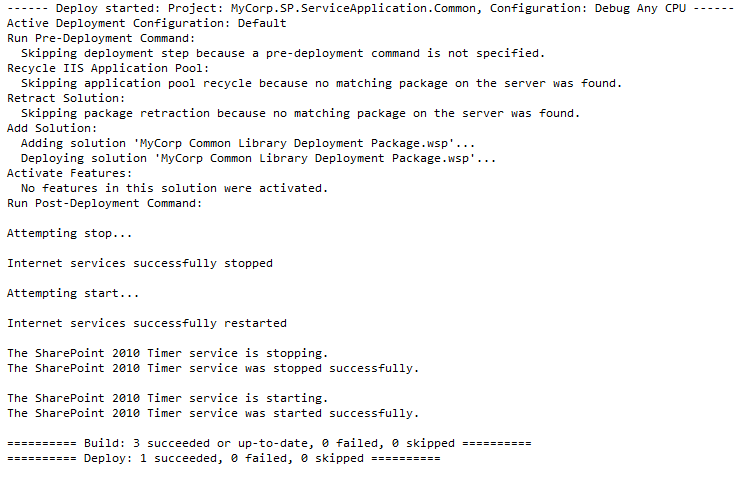 After a clean deployments, let’s make sure the diagnostic areas were created in central admin.
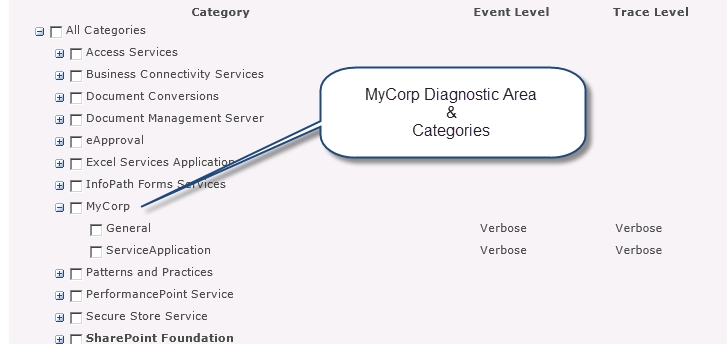 Hmm! I may want to add a space in ServiceApplication for my next post
  . Also, I’ll probably want to default the EventLevel and TraceLevel to something a little higher than Verbose! So everything is good so far, let’s make sure logging works. I’ll open the ULS Viewer or use the SharePoint LogViewer, and filter for the MyCorp product.
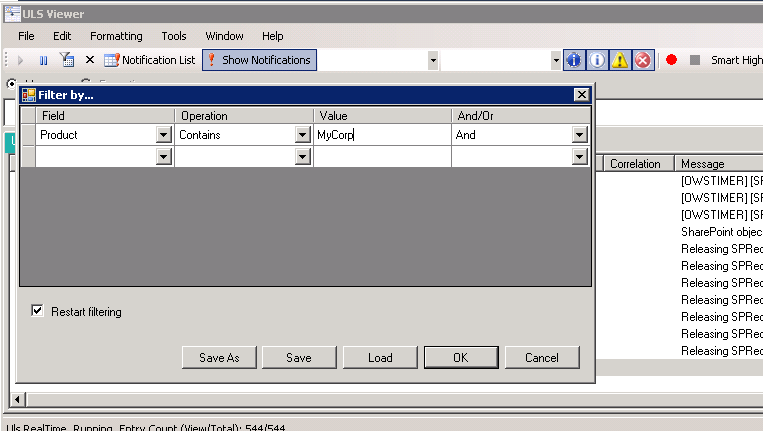 Looks like Logging is working as expected!
 When we uncomment the Event logging, we’ll also see the logs show up in the event log!
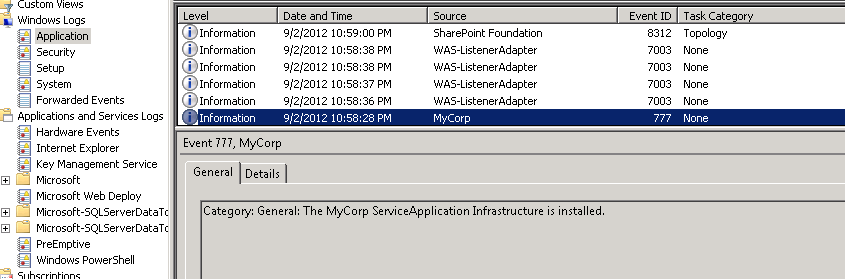 So we now have our basic infrastructure ready for SharePoint development, and we are ready to build a service application for our organization. We will start building our service application with all the bells and whistles in our next post. That’s gonna be a biggy! [Code Download](https://skydrive.live.com/redir?resid=30FD0C7F694C1B3F!293&authkey=!AJ9mKTemY0vGR\_4) Feel free to download, use and abuse the code as you see fit, and as always, use at your own risk , I mean pleasure. Have fun!
Comments
Comments are moderated. Your email is never displayed publicly.