RESTful Api and UI for Typed Views and Typed Lists with LLBLGen and ServiceStack
In this post, we extend the implementation described in the prior post to include generating an HTML UI and RESTful Api on top of LLBLGen Typed Views and Typed Lists, leveraging the ServiceStack web s
In this post, we extend the implementation described in the prior post to include generating an HTML UI and RESTful Api on top of LLBLGen Typed Views and Typed Lists, leveraging the ServiceStack web service and razor framework. The api provides paging, sorting, filtering - source is hosted on GitHub, and a demo is included as well.
Intro
Before you read this post, make sure you catch up by reading the previous post first. [See the Demo](http://northwind.mattjcowan.com) [Get the Source](https://github.com/mattjcowan/LLBLGenPro\_SS\_Api\_Razor\_Templates)
Demo
JUST SHOW ME! Screenshots, demo link, and source on GitHub
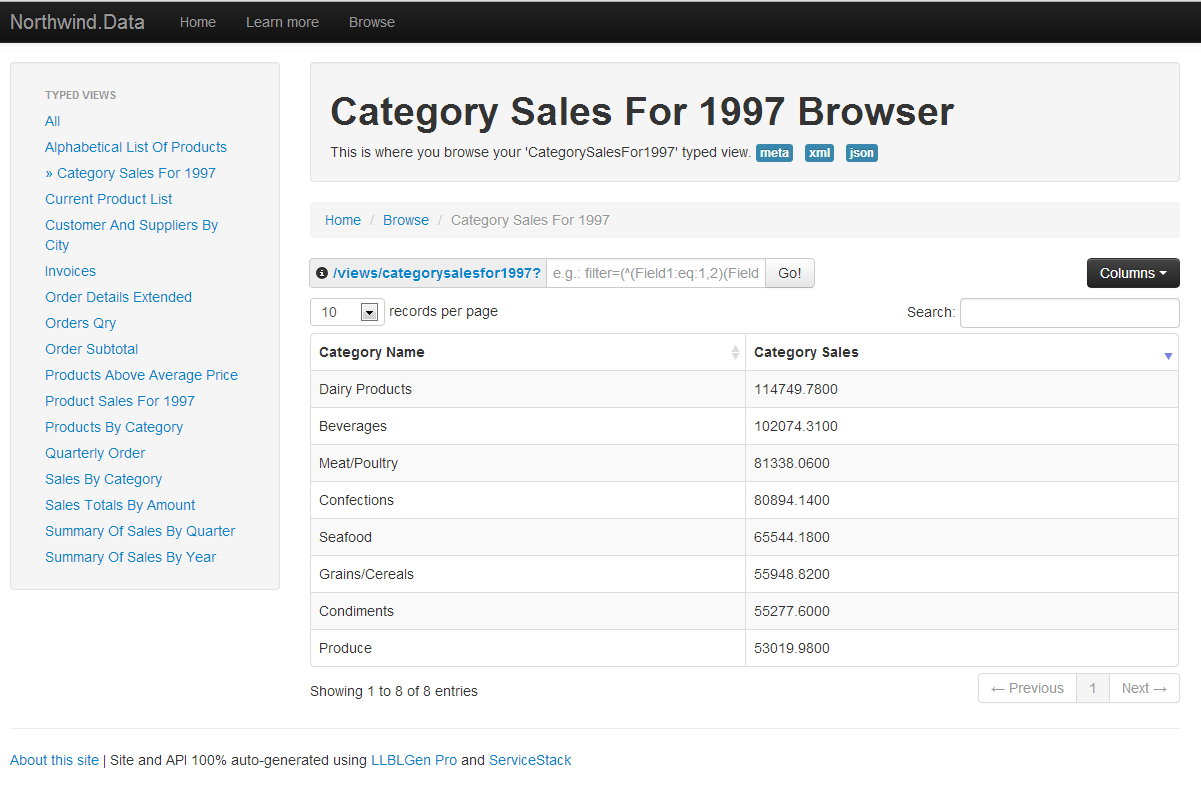
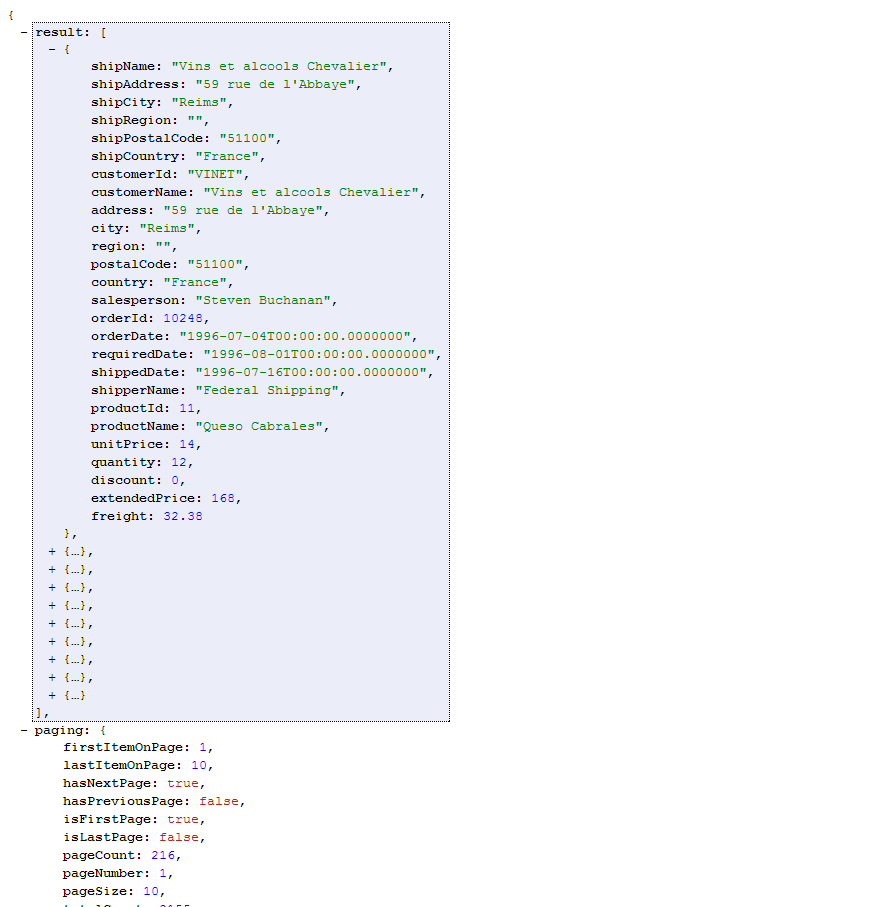
- Go here for the demo: http://northwind.mattjcowan.com
- Go here for the demo of the Entity Browser: http://northwind.mattjcowan.com/entities
- Go here for the demo of the Typed View Browser: http://northwind.mattjcowan.com/views
- Go here for the demo of the Typed List Browser: http://northwind.mattjcowan.com/lists
- Go here for the source (hosted on GitHub): https://github.com/mattjcowan/LLBLGenPro_SS_Api_Razor_Templates
Typed Views and Typed Lists
Of the many great features included in LLBLGen Pro, two of these include Typed Views and Typed Lists. Simply put, Typed Views represent typed datatables mapped to database views, tables and/or stored procedures, and Typed Lists are “Design typed projections over a set of related entities using a query designed in the LLBLGen Pro designer”. Read about them on the LLBLGen Pro website. The RESTful Api that I put together for this post emulates the same concepts already described in the last post for paging, filtering, and sorting. The Typed View and Typed List Api is a little simpler, in that there is no Create, Update, or Delete. Also, there are no relations so filtering is strictly done against the typed view fields and typed lists fields, as opposed to also being able to traverse relationships as seen in the prior post when using the Entity api.
Typed Views
The Typed View API allows a user or application to discover the typed views available in the system.
| Uri | Parameters | Protocol | Formats |
|---|---|---|---|
| {baseUri}/views {baseUri}/views/meta {baseUri}/views?format=xml {baseUri}/views?format=json | <none> | GET | [ html ] [ meta ] [ xml ] [ json ] |
The API gives you an “HREF” property back for each typed view that you can store and use to navigate to each particular typed view.
Querying Typed Views
Once you have obtained your list of typed views, you can browse a specific typed view using the “slug/name” of the typed view, or just follow the “href” property of the discoverable typed view API above.
| Uri | Parameters | Protocol | Formats |
|---|---|---|---|
| {baseUri}/views/{typedViewName} | |||
| {baseUri}/views/invoices {baseUri}/views/invoices/meta {baseUri}/views/invoices?format=xml {baseUri}/views/invoices?format=json | select={select} sort={sort} filter={filter} pageSize={pageSize} pageNumber={pageNumber} | GET | [ html ] [ meta ] [ xml ] [ json ] |
More Advanced Queries
See the section Advanced Queries in the last post to get an idea of how queries are composed, including AND / OR and NESTED statements, including all the query operators that can be used. Here are some more advanced queries on the “Invoices” typed view.
Compound filter
Here we will filter all invoices that meet the following criteria:
- All invoices with “City = Strasbourg” and SalesPerson starting with the name “Andrew”
- OR, all invoices with an extended price greater than 15000
Paging sample with filter
Here we’ll get page 2 of all invoices with “City = Strasbourg”. REST API URL (use the grid to do the paging in the HTML implementation): http://northwind.mattjcowan.com/views/invoices?pageNumber=2&filter=city:eq:strasbourg See the REST Api here: [ JSON version | XML version ]
Compound sorting sample
Sorting the resultset by shipping postal code, then by quantity, and then finally by extended price (descending order). REST API URL (use the grid to do sorting in the HTML implementation): http://northwind.mattjcowan.com/views/invoices?sort=shippostalcode,quantity,extendedprice:desc&format=json See the REST Api here: [ JSON version | XML version ]
Typed Lists
The Typed Lists API allows a user or application to discover the typed lists available in the system.
| Uri | Parameters | Protocol | Formats |
|---|---|---|---|
| {baseUri}/lists {baseUri}/lists/meta {baseUri}/lists?format=xml {baseUri}/lists?format=json | <none> | GET | [ html ] [ meta ] [ xml ] [ json ] |
The API gives you an “HREF” property back for each typed list that you can store and use to navigate to each particular typed list.
Querying Typed Lists
Once you have obtained your list of typed lists, you can browse a specific typed list using the “slug/name” of the typed list, or just follow the “href” property of the discoverable typed list API above.
| Uri | Parameters | Protocol | Formats |
|---|---|---|---|
| {baseUri}/lists/{typedListName} | |||
| {baseUri}/lists/employeesbyregionandterritory {baseUri}/lists/employeesbyregionandterritory/meta {baseUri}/lists/employeesbyregionandterritory?format=xml {baseUri}/lists/employeesbyregionandterritory?format=json | select={select} sort={sort} filter={filter} pageSize={pageSize} pageNumber={pageNumber} | GET | [ html ] [ meta ] [ xml ] [ json ] |
More Advanced Queries
Advanced queries for Typed Lists are done in the exact same way as for Typed Views above.
Conclusion
It’s been fun to hear from those that have started to put these templates to use in their projects, even extending the templates to suit their own needs. Feel free to reach out to me or post your comments below. Have fun!
Comments
Comments are moderated. Your email is never displayed publicly.