Building a Web API in SharePoint 2010 with ServiceStack
Recently, while building a custom service application in SharePoint, I was exploring various ways of creating a web API, hosted within SharePoint. Obviously, using WCF is the standard in SharePoint, b
Recently, while building a custom service application in SharePoint, I was exploring various ways of creating a web API, hosted within SharePoint. Obviously, using WCF is the standard in SharePoint, but it certainly is not the only way. In this post we will create the barebone essentials for building out a web service API, hosted within SharePoint 2010, using ServiceStack.
Background
Recently, while building a custom service application in SharePoint, I was exploring various ways of creating a web API, hosted within SharePoint. Obviously, using WCF is the standard in SharePoint, but it certainly is not the only way. That’s when the thought of trying ServiceStack came into existence. Why ServiceStack? Because it gives you XML, JSON, JSV, CSV, SOAP 1.1 and SOAP 1.2 response types out-of-the-box! That’s pretty cool, and it’s just a start. It also provides a consistent way of developing services and great performance (check out these benchmarks). Check out this interesting read by Phillip Haydon as well as he takes ServiceStack for a spin. Most of all, ServiceStack is super fun. In this post we will create the barebone essentials for building out a web service API, hosted within SharePoint 2010, using ServiceStack.
Getting Started
> Recent Update (Dec. 26, 2012) > > Some mods to the ServiceStack platform have recently made it easier to setup the App Host, and we don’t need to modify the ServiceStack code any longer (as described in this post). The rest remains the same. That said, SharePoint still requires that the ServiceStack assemblies be strongly signed. I have added a new project to my skydrive folder for this blog post called “SP123”, please see the readme.txt file in that *.zip file with more details. Let’s flesh out the SharePoint project. I’ll create 1 class library project, and 1 empty SharePoint project in my solution. The solution MUST be a Farm Solution, because we’re going to have to do a web.config mod, BUT, only to deploy the infrastructure. This will play really nicely with sandboxed solutions once the API is deployed, especially with jQuery or whatever other JS framework you fancy. > You will need to download the zip files or clone the Git repositories if you want to deploy ServiceStack to the GAC. Oh, and I’ll be making 1 tiny little change to the ServiceStack source code (BUT, you don’t have to if you are ok with the alternative, which I’ll describe later). So all in all, you can still make it work without this unfortunate thing, by accepting the alternative web.config mods (described later in this post), and NOT deploying the dlls to the GAC (deploy to the bin instead).
Project Structure
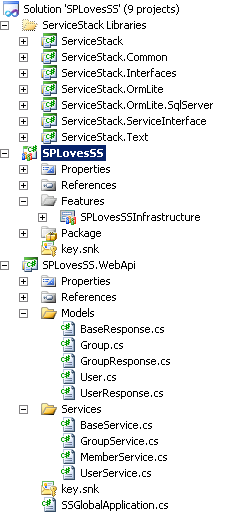
My final solution looks like this:
Deploying ServiceStack
To deploy to the GAC, I strongly typed SSPLoveSS.WebApi, as well as all the ServiceStack libraries, and then I froze the versions on all the libraries for this exercise as well.
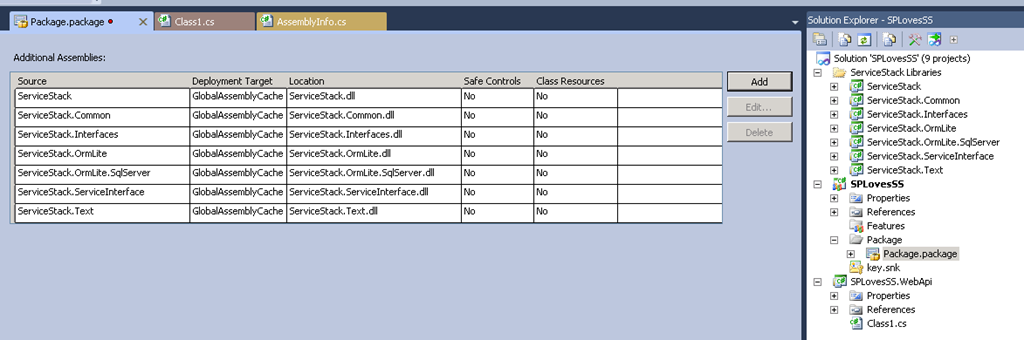
 To deploy the ServiceStack dlls, either use gacutil on your dev (if you strongly type them like I’m doing), or add the dlls to the SharePoint deployment package and then deploy to the GAC or the bin:
API Development
We’ll create an API that - RESTfully:
- Lists all the groups in a web
- Lists all the members of a group
- Lists all the users in a web
- Allows us to create a new group
- Allows us to delete a group
- Allows us to modify a group name
Our RESTful resources “could” look like this.
- /api/groups: lists all groups in a web (verb=GET), create a group (verb=PUT)
- /api/groups/{groupName}: deletes a group (verb=DELETE)
- /api/groups/{groupName}/members: lists all members of a group (verb=GET), adds a member to a group (verb=POST)
- /api/groups/{groupName}/members/{memberName}: removes a member from a group (verb=DELETE)
You certainly could do this! But, you don’t take advantage then of SharePoint 2010 built-in url rewriting that automatically gives you SPSite and SPWeb context, like it does for /_layouts/ and /_vti_bin/ urls. We want our API to be context specific to the SPWeb you are in, so let’s change the API resource urls to the following, which will inherit the SharePoint url rewriting magic (small price to pay for the benefit).
- /_layouts/api/groups: lists all groups in a web (verb=GET), create a group (verb=PUT)
- /_layouts**/api/groups/{groupName}:** deletes a group (verb=DELETE)
- /_layouts**/api/groups/{groupName}/members:** lists all members of a group (verb=GET), adds a member to a group (verb=POST)
- /_layouts**/api/groups/{groupName}/members/{memberName}:** removes a member from a group (verb=DELETE)
The web.config changes (just add this to the feature receiver to insert the changes during deployment, see source code download at the end of this post) are as follows:
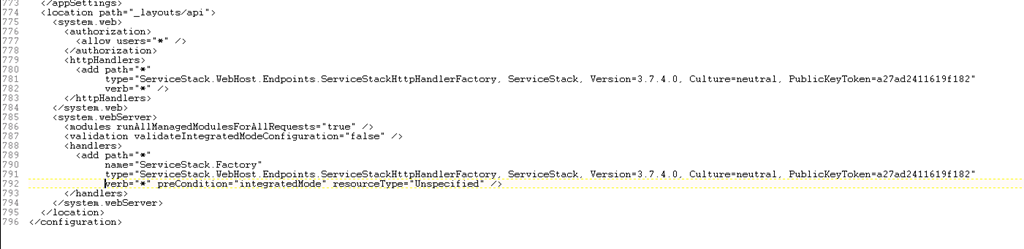 In order to make the path “_layouts/api” work above, I had to insert 2 lines into the ServiceStack source, in the “ServiceStackHttpHandlerFactory” class. This class, as written in ServiceStack makes assumptions about the virtual directory format (as far as I can tell, after a cursory look), and these assumptions don’t work for us. My changes are as follows:
public static IHttpHandler GetHandlerForPathInfo(string httpMethod, string pathInfo, string requestPath, string filePath)
{
    var pathParts = pathInfo.TrimStart(‘/’).Split(‘/’);
    if (pathParts.Length == 0) return NotFoundHttpHandler;
    // BEGIN MOD for SharePoint
    if (pathParts.Length > 2 && pathParts[0].Equals("_layouts", StringComparison.OrdinalIgnoreCase))
        pathParts = pathParts.Skip(2).ToArray();
    // END MOD for SharePoint
    var handler = GetHandlerForPathParts(pathParts);
    if (handler != null) return handler;

    // …. rest of method ….

}
The alternative to making these changes to the source code are to specify the individual Handlers in the web.config, instead of using the Handler factory class. This is the format used in the ServiceStack examples download. That would look something like this instead:
 As far as building services, I won’t go over the details here, it’s extremely simple and ServiceStack has a very clear tutorial on how to do this. I highly suggest you follow it to get started. If you use Nuget, you can use the “Install-Package ServiceStack” command. Avoid the “ServiceStack.Host.AspNet” package in a .NET 3.5 project because the package download has some framework dependency issues with a couple 3rd party libraries that require .NET 4.0 (at the time of this writing, i.e.: Web Activator). The services I implemented here to meet the use-case are straightforward, here’s what the “GroupService” looks like:
[CollectionDataContract(Name = "groups", ItemName = "group")]
public class GroupList : List
{
    public GroupList()
    {
    }

    public GroupList(IEnumerable collection)
        : base(collection)
    {
    }
}

[DataContract(Name = "group")]
public class Group
{
    public Group() { Members = new UserList(); }
    public Group(SPGroup group)
        : this()
    {
        this.Id = group.ID;
        this.Name = group.Name;

        this.Members = new UserList(group.Users.Cast().Select(u => new User(u)));
        this.MemberCount = Members.Count;
    }

    [DataMember(Name = "id", Order = 1)]
    public int Id { get; set; }
    [DataMember(Name = "name", Order = 2)]
    public string Name { get; set; }
    [DataMember(Name = "count", Order = 3)]
    public int MemberCount { get; set; }
    [DataMember(Name = "members", Order = 4)]
    public UserList Members { get; set; }
}

[RestService("/_layouts/api/groups", "GET,PUT")]
[RestService("/_layouts/api/groups/{Ids}", "GET,POST,DELETE")]
public class GroupRequest : Group
{
    public string Ids { get; set; }
}

public class GroupService : BaseService
{
    // Get 1 or more groups
    public override object OnGet(GroupRequest request)
    {
        if (!IsAuthenticated) return new HttpResult(HttpStatusCode.Unauthorized, "Requires authentication");

        try
        {
            var ids = string.IsNullOrEmpty(request.Ids)
                          ? null
                          : request.Ids.Split(',').Select(i => Convert.ToInt32(i)).ToArray();

            var groups = new List();
            var spGroups = CurrentWeb.Groups;
            foreach (SPGroup spGroup in spGroups)
            {
                if (ids == null || ids.Contains(spGroup.ID))
                    groups.Add(new Group(spGroup));
            }

            return new GroupResponse(CurrentWeb, groups, GetQueryStringValue("sort", "asc"));
        }
        catch
        {
            return new HttpResult(HttpStatusCode.BadRequest, "Invalid request");
        }
    }

    // Create a group
    public override object OnPut(GroupRequest request)
    {
        if (!IsAuthenticated) return new HttpResult(HttpStatusCode.Unauthorized, "Requires authentication");

        if(string.IsNullOrEmpty(request.Name))
            return new HttpResult(HttpStatusCode.BadRequest, "Name is missing");

        try
        {
            var web = CurrentWeb;
            var groupName = request.Name;
            var user = SPContext.Current.Web.CurrentUser;

            var groupArray = new string[] {groupName};

            web.AllowUnsafeUpdates = true;

            var groupCollection = web.SiteGroups.GetCollection(groupArray);
            if (groupCollection.Count == 0)
            {
                web.SiteGroups.Add(groupName, user, null, "The " + groupName + " group");
            }
            var spGroup = web.SiteGroups[groupName];

            var roleDef = web.RoleDefinitions.GetByType(SPRoleType.Contributor);
            var roles = new SPRoleAssignment(spGroup);
            roles.RoleDefinitionBindings.Add(roleDef);
            web.RoleAssignments.Add(roles);

            //// Assign to site
            spGroup.AddUser(user);
            spGroup.Update();

            web.AllowUnsafeUpdates = false;

            return new HttpResult(HttpStatusCode.OK, "SUCCESS");
        }
        catch (UnauthorizedAccessException uex)
        {
            return new HttpResult(HttpStatusCode.Forbidden, uex.Message);
        }
        catch (Exception ex)
        {
            return new HttpResult(HttpStatusCode.BadRequest, ex.Message);
        }
    }

    // Update the group
    public override object OnPost(GroupRequest request)
    {
        if (!IsAuthenticated) return new HttpResult(HttpStatusCode.Unauthorized, "Requires authentication");

        if (string.IsNullOrEmpty(request.Name))
            return new HttpResult(HttpStatusCode.BadRequest, "Name is missing");

        try
        {
            var ids = string.IsNullOrEmpty(request.Ids)
                          ? null
                          : request.Ids.Split(',').Select(i => Convert.ToInt32(i)).ToArray();

            if (ids == null || ids.Length == 0)
                return new HttpResult(HttpStatusCode.BadRequest, "Id is missing");

            CurrentWeb.AllowUnsafeUpdates = true;

            var spGroup = CurrentWeb.Groups.GetByID(ids[0]);
            spGroup.Name = request.Name;
            spGroup.Update();

            CurrentWeb.AllowUnsafeUpdates = false;

            return new HttpResult(HttpStatusCode.OK, "SUCCESS");
        }
        catch (UnauthorizedAccessException uex)
        {
            return new HttpResult(HttpStatusCode.Forbidden, uex.Message);
        }
        catch (Exception ex)
        {
            return new HttpResult(HttpStatusCode.BadRequest, ex.Message);
        }
    }

    // Delete 1 or more groups
    public override object OnDelete(GroupRequest request)
    {
        if (!IsAuthenticated) return new HttpResult(HttpStatusCode.Unauthorized, "Requires authentication");

        try
        {
            var ids = string.IsNullOrEmpty(request.Ids)
                          ? null
                          : request.Ids.Split(',').Select(i => Convert.ToInt32(i)).ToArray();

            if (ids == null || ids.Length == 0)
                return new HttpResult(HttpStatusCode.BadRequest, "Ids are missing");

            CurrentWeb.AllowUnsafeUpdates = true;

            foreach (var id in ids)
            {
                CurrentWeb.Groups.RemoveByID(id);
            }
            CurrentWeb.Update();

            CurrentWeb.AllowUnsafeUpdates = false;

            return new HttpResult(HttpStatusCode.OK, "SUCCESS");
        }
        catch (UnauthorizedAccessException uex)
        {
            return new HttpResult(HttpStatusCode.Forbidden, uex.Message);
        }
        catch (Exception ex)
        {
            return new HttpResult(HttpStatusCode.BadRequest, ex.Message);
        }
    }
}
I added an event receiver to the feature (see source code download) to configure web.config and the global.asax file to enable the ServiceStack handlers. And that’s it, we’re ready to deploy.
See it in Action
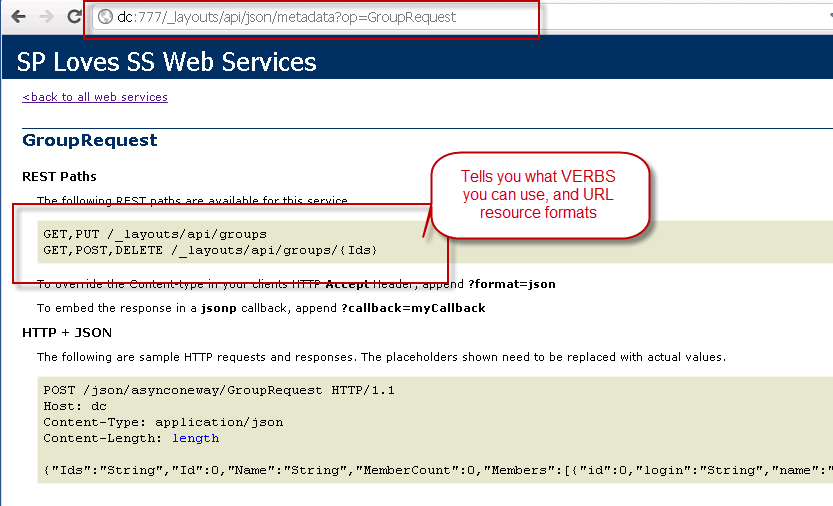
ServiceStack automatically gives you a full metadata screen that documents the web services. ServiceStack automatically supports JSON, XML, JSV, CSV, SOAP 1.1 and SOAP 1.2 response types.
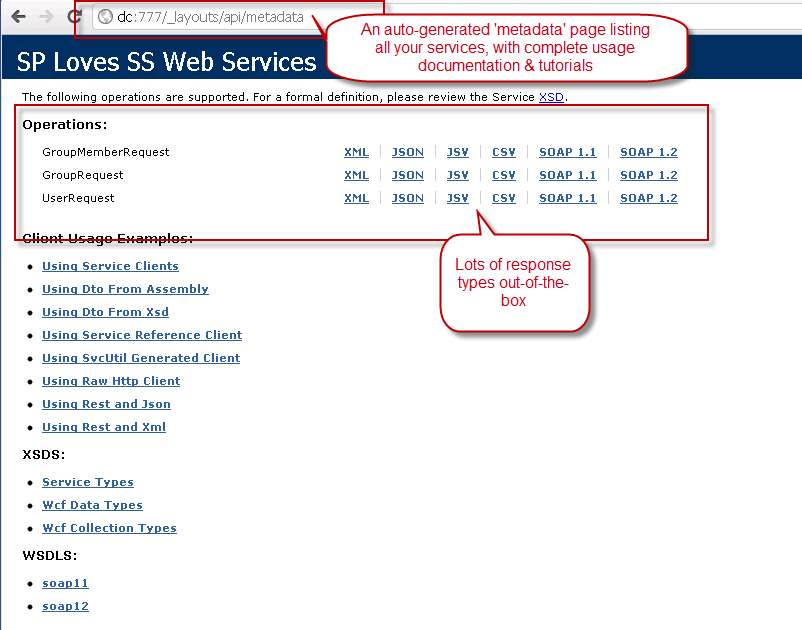 ServiceStack automatically describes each method with supported VERBS and how to use it.
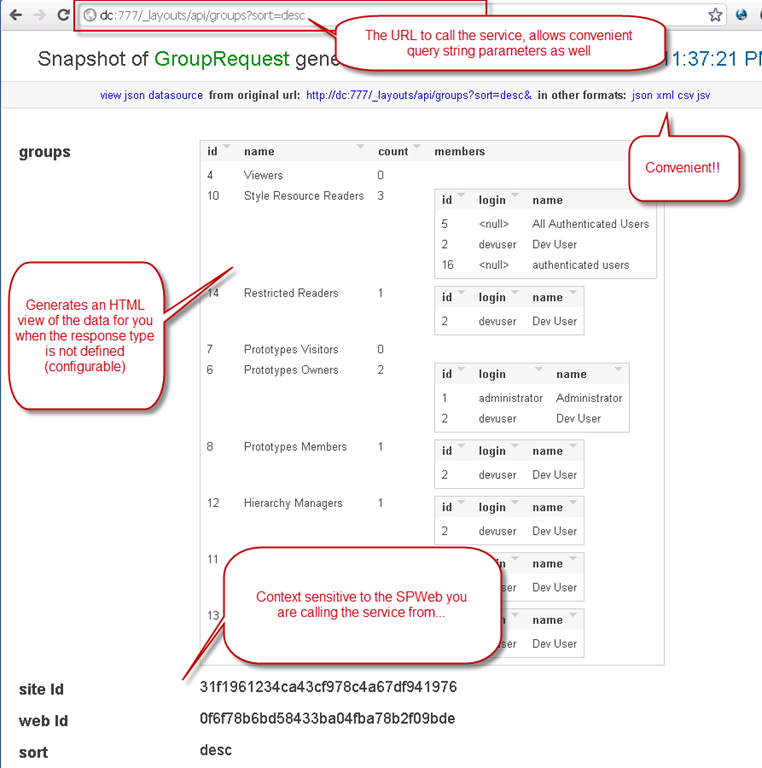
 ServiceStack automatically gives you a nice HTML5 view of the data for GET requests, and links to call the other response types.
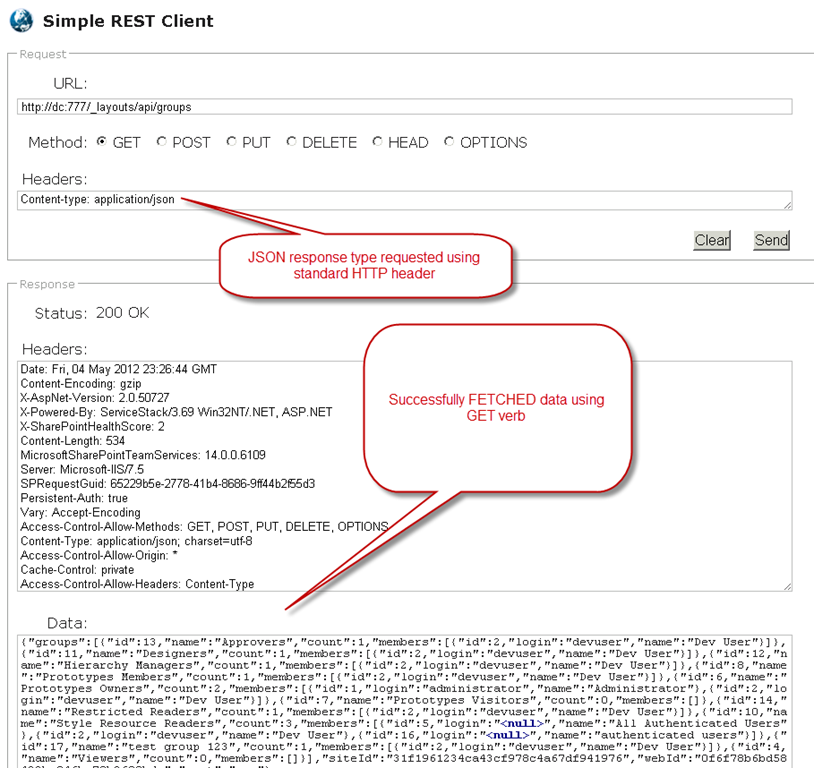
 ServiceStack supports the standard HTTP headers to call services as desired. In this screenshot, the Content Type specified is application/json on a GET request for all groups in an SPWeb.
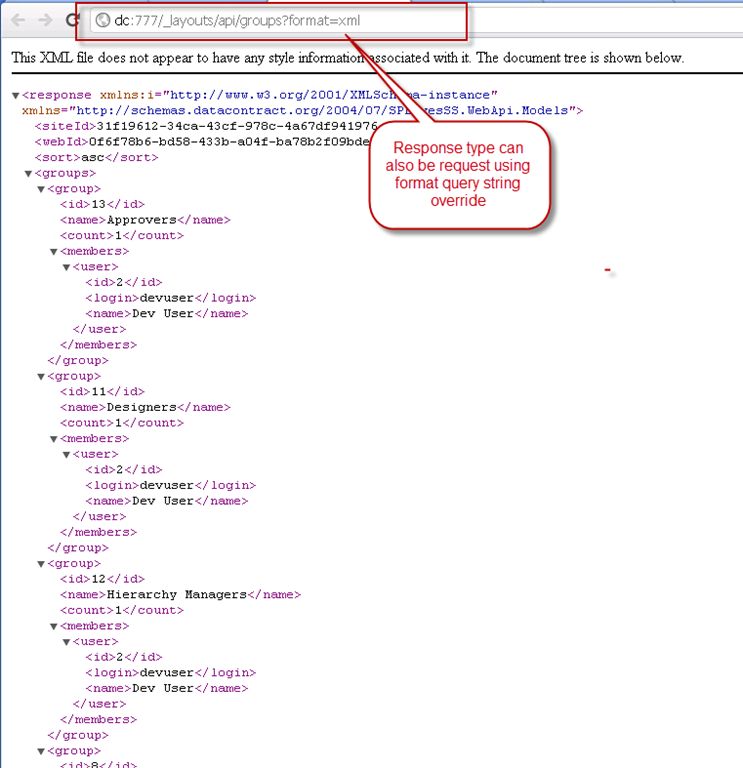
 In the following screenshot, the Content Type specified is application/xml, using an OVERRIDE in the URL. The serialized XML obeys all the DataContract serialization attributes for naming and ordering conventions.
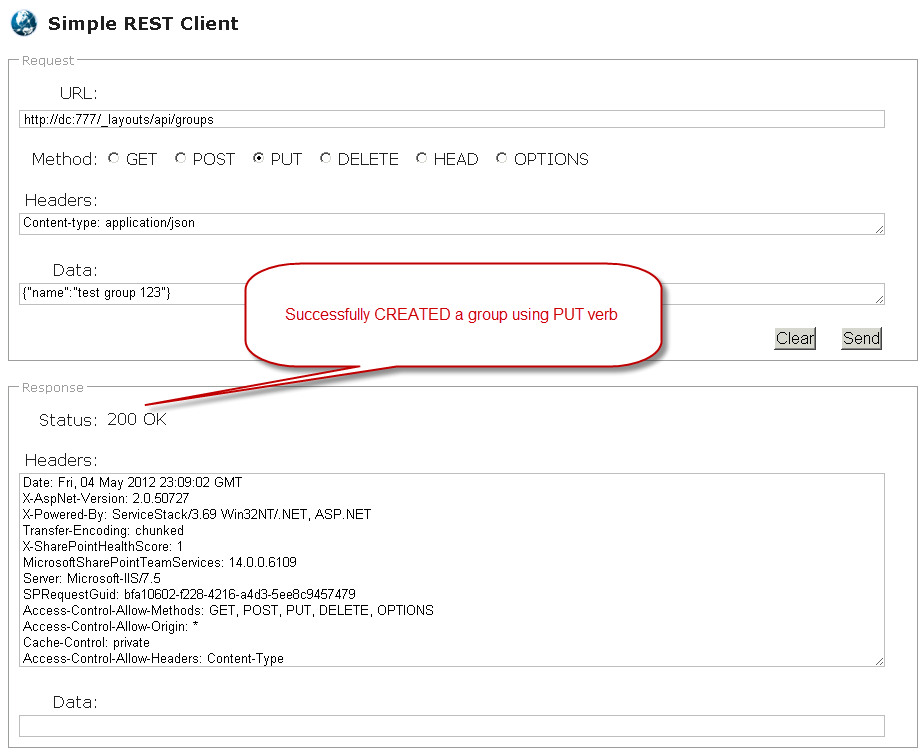
 Here we create a SharePoint group using a PUT request.
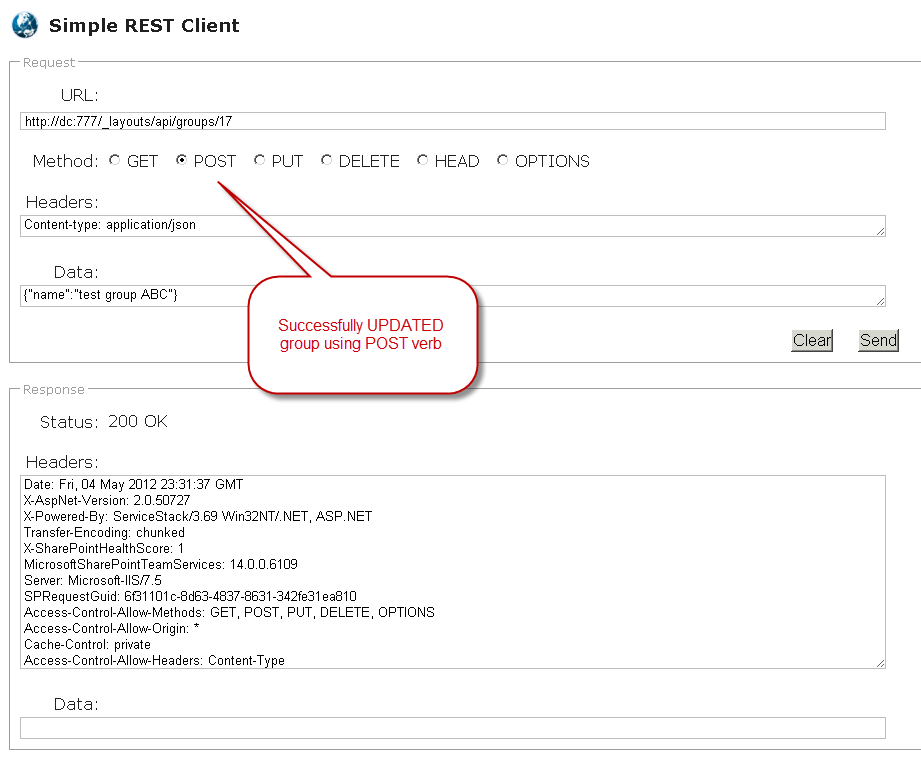
 Here we update a SharePoint group name using a POST request.
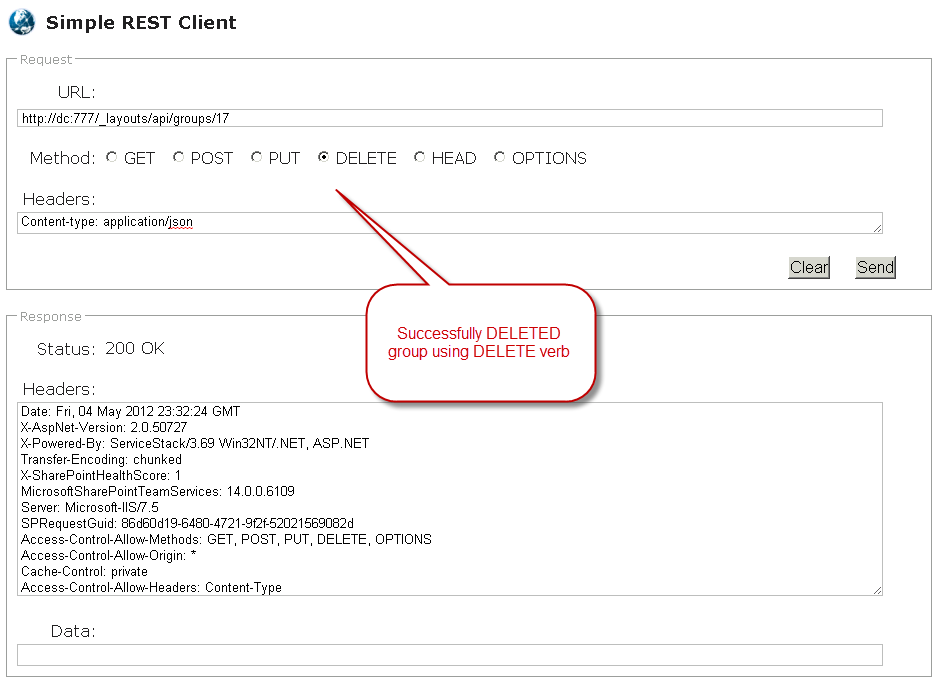
 Here we delete a SharePoint group using a DELETE request.
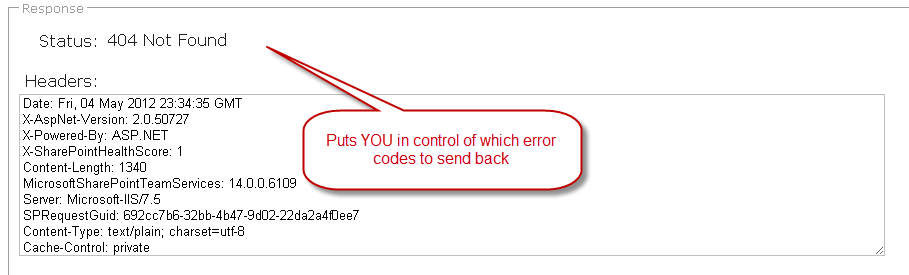
 ServiceStack also does great error handling, and gives you full control over what Status Codes you wish to return and any accompanying messaging.
Conclusion
So there we have it. These APIs are obviously completely compatible with jQuery and any other javascript framework, and they provide a great foundation for hosting a nice self-documenting API within SharePoint. Once the infrastructure file is changed, updating the API with new methods just takes a simple DLL update. Well, hopefully you enjoyed this post as much as I enjoyed putting this little prototype project together. Thanks for reading, and please do check out the download and modify as you see fit. You’ll have to download the ServiceStack code/binaries from Github. [Download Code](http://sdrv.ms/VeD7nu)
Comments
Comments are moderated. Your email is never displayed publicly.